3.2 Smart Filters for ICP-Based Segmentation
ReactIn lets you narrow down any SmartList using powerful filters to target your ideal customer profile (ICP) — without editing the list itself. This means you can run ultra-targeted campaigns from a single, shared SmartList without duplicating data.
Written By Theo Remola
Last updated Over 1 year ago
🎯 What Smart Filters let you do
When creating a campaign, you can apply filters to:
Target only leads with a specific title or seniority
Limit to certain industries or company sizes
Segment by location, language, or LinkedIn activity
Or filter any variable you want
🔍 You can combine multiple conditions using AND/OR logic.
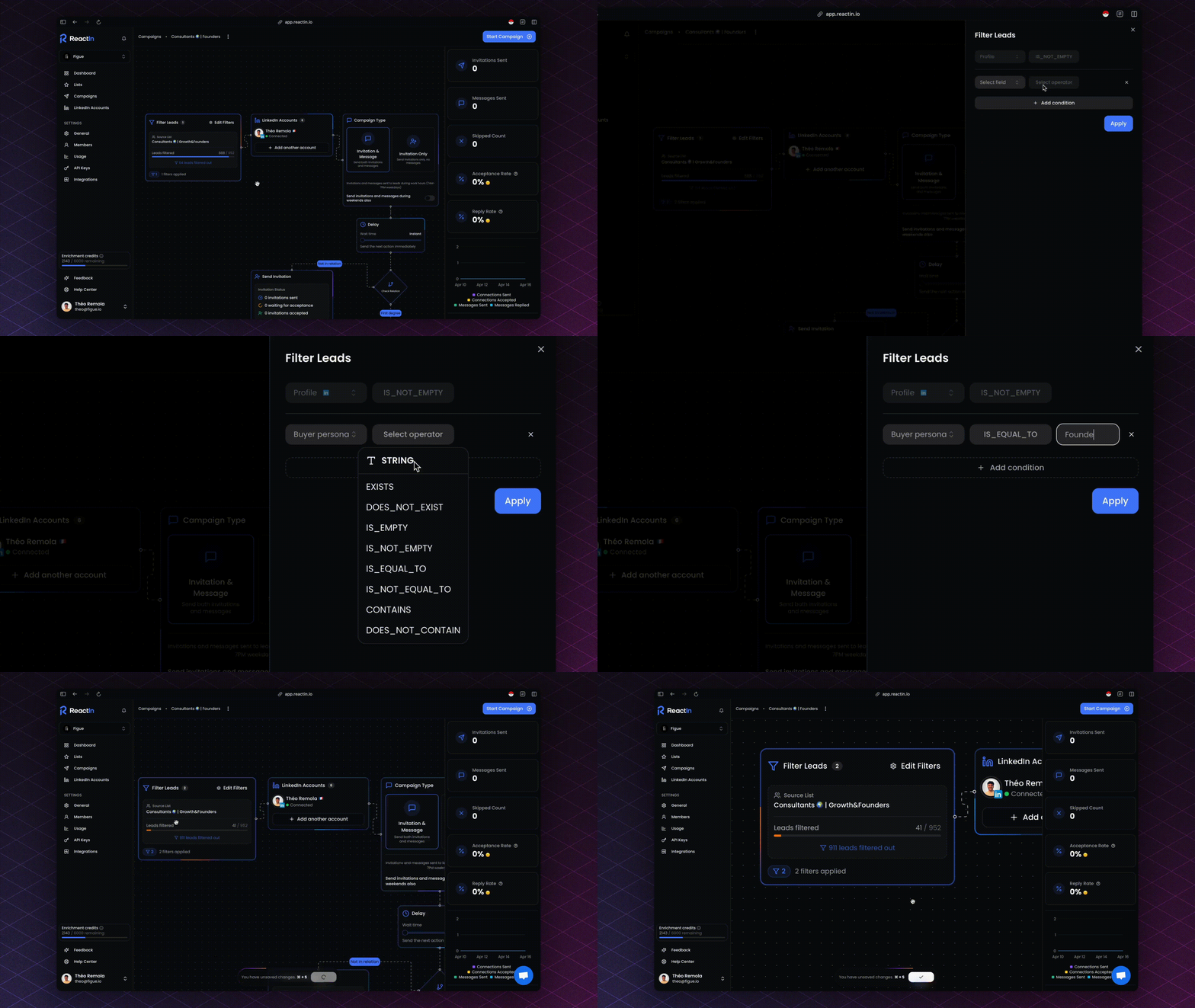
⚙️ Filter types available
You can filter both enriched and non-enriched data — depending on your campaign strategy.
🔁 Filters vs. segmentation
Applying filters doesn’t modify your SmartList. It simply tells ReactIn:
Who to target in this specific campaign
How to segment leads at runtime
This means you can reuse the same SmartList in multiple campaigns with different filters — for example:
Campaign A → target "Founders in B2B SaaS"
Campaign B → same list, but "Growth Managers in UK"
🧪 Use case example
You built a large SmartList of scraped profiles from a conference attendee list. Instead of blasting everyone, you filter only:
Leads with
ICP = FreelancesLocated in the US
Title contains “Marketing” or “Growth”
Then you launch a hyper-relevant invite + message flow — while keeping the rest of the leads untouched for future use.
💡 Pro tip: Use filters to test message variants on micro-segments before rolling them out across your entire audience.
Ready to move on?
👉 Next Step: Rotation Logic Across Accounts →